Guide
Best AI Spend Management Tools for SaaS Teams in 2026
This list is for software companies that sell AI features on a fixed subscription. Each customer pays the same price every month, but what they cost you in model calls can vary several times over from one customer to the next, and a single busy agent can turn a profitable account into a loss without anyone noticing until the invoice arrives. So the questions that matter are: which customers cost more than they pay, and what stops one customer or agent from running up the bill?
The short answer:
- To see margin per customer and stop any one customer or agent going over budget, across providers: Spendline (our product).
- To put AI costs into a company-wide cost platform alongside cloud: CloudZero, Vantage or Finout.
- To run your own gateway with budgets, for free: LiteLLM.
- For a managed gateway with prompt management and guardrails: Portkey.
- For a free dollar cap on traffic you already send through Cloudflare: Cloudflare AI Gateway.
- For tracing and evals: Langfuse.
- For a free safety net on one provider: OpenAI's and Anthropic's own spend limits.
We make Spendline and rank it first, so read the list with that in mind. Every claim about another product links to that vendor's own documentation or pricing page, checked on 3 October 2026. Where another tool is the better buy, we say so.
What to look for when you sell AI features
Most tools in this category can attach a customer ID to an AI call. Fewer turn that into something a finance team can act on. Four things separate them.
Cost recorded per customer, on every call. Your provider bills you by project, API key and model. It has no idea which of your customers a call was for. A gateway or proxy can record the customer on each request. A cost platform that starts from the provider bill has to allocate cost to customers afterwards, using rules or usage data you send it.
That cost next to what the customer pays. A customer tag tells you cost. Margin needs revenue too. This is the difference between a dashboard engineers use and a number finance can use in a pricing or renewal conversation.
A stop before the call, shaped like your business. Only tools in the request path can refuse a call before the provider charges for it. What matters for a SaaS company is the shape of those limits: each customer stays within its own allowance, the agents serving that customer share it, and the team running them stays within its overall budget. Several gateways can approximate this with overlapping rules. The difference is whether that structure comes built in for every customer or is maintained by hand, rule by rule.
A human decision for exceptions. Sometimes a customer should be allowed to run over. That should be a recorded decision by someone with authority, not a raised limit nobody remembers changing.
| Tool | Customer cost | Margin | Blocks calls | Customer limits | Approvals | Price |
|---|---|---|---|---|---|---|
| Spendline | Per call | Yes | Yes | Built in | Yes | $500/mo + 1% |
| CloudZero | Allocated from usage data | Listed as a feature | No | No | No | On request |
| Vantage | Allocated from billing | Not per customer in docs | No | No | No | Free up to $2,500 spend |
| Finout | Allocated by tags | Not in docs | No | Alerts only | No | On request |
| LiteLLM | Per call | No | Yes | Teams nest; customers separate | No | Free, self-hosted |
| Portkey | Per call | No | Enterprise | Workspace and key | No | Free tier; $49/mo |
| Cloudflare AI Gateway | Per call | No | Yes | Up to 20 overlapping rules | No | Free |
| Langfuse | Per trace | No | No | No | No | Free tier; $29/mo |
| Helicone | Per call | No | Rate limit per window | Per user or property | No | Free tier; $79/mo |
| OpenAI, Anthropic | By project or workspace | No | Whole project or workspace | Org, project, workspace | No | Free |
Spendline's customer margin reporting is listed on its Platform plan, $1,500 a month plus 0.75% of AI spend.
1. Spendline
Best for SaaS companies that need margin per customer and a hard stop on any one customer or agent.
Spendline sits between your application and your model providers. You change the base URL your code sends model calls to, add headers naming the customer, agent and team, and every call is priced and recorded against them across ten providers: OpenAI, Anthropic, Google Gemini, xAI, Mistral, DeepSeek, Alibaba Qwen, Together AI, Fireworks AI and Groq. Type in or import each customer's revenue and the customer view shows margin after AI cost for every account, comparing cost with revenue over the same days, flags customers below 40%, and breaks any one customer down by agent and model.
Budgets nest from the company down to a team, an agent and a single customer, so every customer gets its own allowance, its agents draw on it, and no customer can push a team past its budget. On a strict budget, a call that would break it gets an HTTP 402 instead of reaching the provider, and alerts go to your Slack or Discord at 50, 80, 90 and 100% of a budget. A budget can also be set to require approval: calls over it are refused until an admin requests an override and a different owner approves it, which raises that limit for the current month. Separately, reroute rules can send chosen calls to a cheaper model. Every call and every refusal is recorded, and corrections are added as new entries, never edits.
An example. This one is illustrative. A customer pays you $500 a month. By the 20th of a 30-day month its AI calls have cost $420, which is 84% of the month's subscription with ten days still to go. Most of it came from one research agent whose $300 monthly budget has reached $270.
- See it. Spendline compares that cost with the revenue earned over the same 20 days, about $333, so the customer view shows the account at roughly minus 26% margin after AI cost and flags it. Opening it shows the research agent is where the money went, and which model it is using.
- Contain it. The 80% and 90% alerts on the agent's budget have already fired. The budget is strict, so at $300 the agent's next call is refused before it reaches the provider, while the customer's other agents keep working. If this customer should be allowed to run over, the budget can be set to require approval, and the decision is recorded with who made it.
- Explain it. Because each call was recorded against the customer and agent when it happened, you have the per-agent, per-model history for a pricing or renewal conversation with that customer, without rebuilding it from logs.
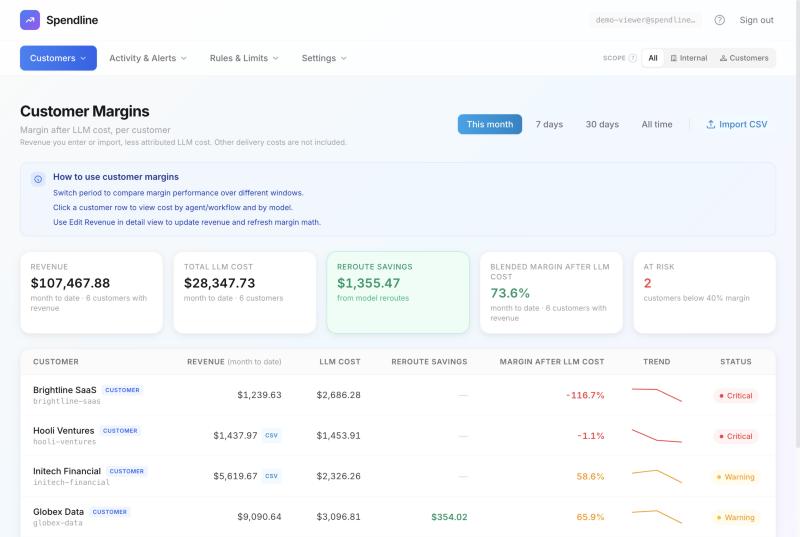
The customer margins view in Spendline's public demo account. Sample data, not real customers.
Where it falls short: it does no prompt tracing or evals, so teams that need those pair it with something like Langfuse. It runs as a hosted proxy; an in-process library for Node.js, which enforces budgets inside your own application while it calls the provider directly, is available to pilot customers but is not yet publicly installable, and there is no Python version. Its budget check prices each call from an estimate of the output, so one unusually long response can settle slightly above a cap. Margin here means revenue minus AI cost, not full gross margin. And it is a young company.
Pricing: Growth is $500 a month plus 1% of AI spend, capped at $1,000 a month in total. Platform is $1,500 plus 0.75%, capped at $3,000, and is the plan that lists customer margin reporting. Enterprise starts at $5,000. Every plan starts with a 60-day free pilot.
2. CloudZero
Best for unit cost across cloud and AI at a larger company.
CloudZero ingests Anthropic and OpenAI cost data next to AWS, Azure and GCP, and calculates cost per customer from usage data you stream into it. Its cost-per-customer page lists margin per customer as a feature. Pricing is a single subscription quoted to your environment.
It works from billing data, so it reports overspend after it happens. If your AI cost is a small part of a large cloud bill, it is likely a better fit than anything else here.
3. Vantage
Best for putting AI bills next to cloud bills on a small budget.
Vantage connects to OpenAI and Anthropic with admin API keys, refreshes daily, and reports AI spend alongside AWS, Azure, GCP and more than 30 other providers. It can calculate gross margin from a revenue metric you supply, though its docs do not show that broken down by customer, and OpenAI cost arrives split by project and API key. Budgets send alerts. The Starter plan is free up to $2,500 of tracked spend, Pro is $30 a month up to $7,500, and Business is $200 a month up to $20,000.
4. Finout
Best for allocating AI spend across the company without code changes.
Finout brings OpenAI, Anthropic, Bedrock and Vertex costs into one bill with cloud and Kubernetes spend, and splits them by team, feature or customer with tagging rules. Its Financial Plans nest, but they track and alert rather than block. Pricing is a yearly fee based on committed spend, quoted, not published.
5. LiteLLM
Best if you want to run the gateway yourself, for free.
LiteLLM is an open-source proxy for more than 100 model APIs. Its budgets are enforced before the call, at the global, team, team member, user, key and end-customer level, and it reserves each call's estimated cost first so concurrent requests cannot jointly overshoot. Team and team-member budgets nest. Customer budgets apply across the whole deployment, outside any team, budgets need its database to work, and model-specific budgets need an Enterprise licence. There is no margin view, and you run it yourself.
6. Portkey
Best for a managed gateway that also handles prompts and guardrails.
Portkey combines routing, fallbacks, observability, prompt management and guardrails, with an open-source gateway you can host. Its budget policies reject requests before they are forwarded, at the workspace or key level and through usage policies, and are available to Enterprise and select Pro customers. The Production plan is $49 a month for 100,000 logged requests.
7. Cloudflare AI Gateway
Best free dollar cap if your traffic already runs through Cloudflare.
AI Gateway added spend limits on 5 June 2026, launched as an open beta. Each rule is scoped by model, provider or custom metadata over a fixed or sliding window, and every matching rule is checked before the call, so you can layer a per-user limit under a gateway-wide one. Any of them can block a call with an HTTP 429. Its docs allow up to 20 rules per gateway and note that concurrent bursts can briefly exceed a limit. That suits a handful of broad limits well; a separate allowance for each of hundreds of customers would need a rule each.
8. Langfuse
Best for engineers who need tracing and evals.
Langfuse is open source, self-hostable and strong on tracing, prompt versions and evaluation. It calculates cost per call from its own model price list and can alert on cost to Slack, a webhook or GitHub Actions, but it does not block calls. Core is $29 a month. Plenty of teams run it alongside a gateway.
9. Helicone
Still works, but the roadmap has stopped.
Helicone combines observability with a gateway, and its custom rate limits can cap spend in cents per rolling window, for example one dollar an hour per user. Mintlify acquired it on 3 March 2026 and it is in maintenance mode: security fixes and new models keep shipping, new features do not. Pro is $79 a month.
10. OpenAI's and Anthropic's own limits
Best free safety net. Set these whatever else you use.
OpenAI added self-service spend limits on 22 July 2026, for the organisation or a project. Requests over the cap fail with a 429, and OpenAI notes enforcement is not instantaneous. Anthropic has a monthly spend limit for the organisation, and workspaces can be capped lower than it.
Each covers one provider, and a cap stops the whole project or workspace, including the customers that did nothing wrong.
FAQ
How do I find out which customers cost more in AI than they pay? Record the customer on every model call when the call is made, then compare that cost with what each customer pays over the same period. Provider bills cannot do this because they do not know your customers. Spendline records it per call and shows margin per customer directly; cost platforms like CloudZero allocate it afterwards from usage data you send.
Can I stop one customer or agent from running up the bill without cutting everyone off? Only with a tool in the request path that supports limits below the project level. Provider caps stop the whole project. Spendline, LiteLLM, Portkey and Cloudflare AI Gateway can each limit narrower scopes; Spendline gives every customer its own allowance inside team and company budgets and can require approval to exceed it.
Can a FinOps platform stop AI overspend? No. CloudZero, Vantage and Finout read billing data after the fact and alert. They cannot refuse a call.
Is there a free option? Yes: OpenAI's and Anthropic's spend limits, Cloudflare AI Gateway's spend limits, a self-hosted LiteLLM, and Vantage's free tier up to $2,500 of tracked spend. None of them shows margin per customer.
Sources and method
Written by Spendline, which makes one of the products listed. Every capability and price for another product comes from the vendor's own documentation, pricing page or announcement, linked where it is cited and checked on 3 October 2026. Where a vendor's docs did not settle a point, such as whether Vantage breaks gross margin down by customer, we say what the docs show rather than guess. Spendline's own capabilities are described as they work in the live product today. The example is illustrative, and the screenshot comes from our public demo account with sample data. This category changes month to month. If we have described a product wrongly, email fida@spendline.ai and we will correct it. Last updated: October 2026.
Can you say which of your customers cost more in AI than they pay? Book a free 30-minute call. No integration is needed: we go through how you track AI cost by customer today and where the gaps are. If there is a real gap, a free 60-day pilot on your own traffic measures the actual exposure, customer by customer. Book the 30-minute call
Not ready to talk? Look around the demo account with sample data, or take the 5-minute assessment.