Spendline sits between your software and AI providers. Track AI cost by customer, compare it with revenue where you share revenue data, and check budgets before supported requests reach the provider.
30-day free pilot on live traffic. No credit card. Paid terms agreed before you start.
Sample data · September 2026
Customer
ExampleCo
Revenue supplied
$1,000
AI cost
$800
Margin after AI cost
20%
Where you share revenue data. Other delivery costs excluded.
ExampleCo · September AI budget · Strict enforcement
$800 of $800 used
Next request: $0.08 estimated
Refused before reaching the provider
Spendline is a member of the NVIDIA Inception program.
See the customer behind the cost.
Customers on the same plan can cost very different amounts to serve. A provider total is not a customer cost breakdown.
Spendline keeps your customer and workflow labels with each supported request. See the costs behind an account, compare them with revenue where you share revenue data, and decide how its budget should work.
1
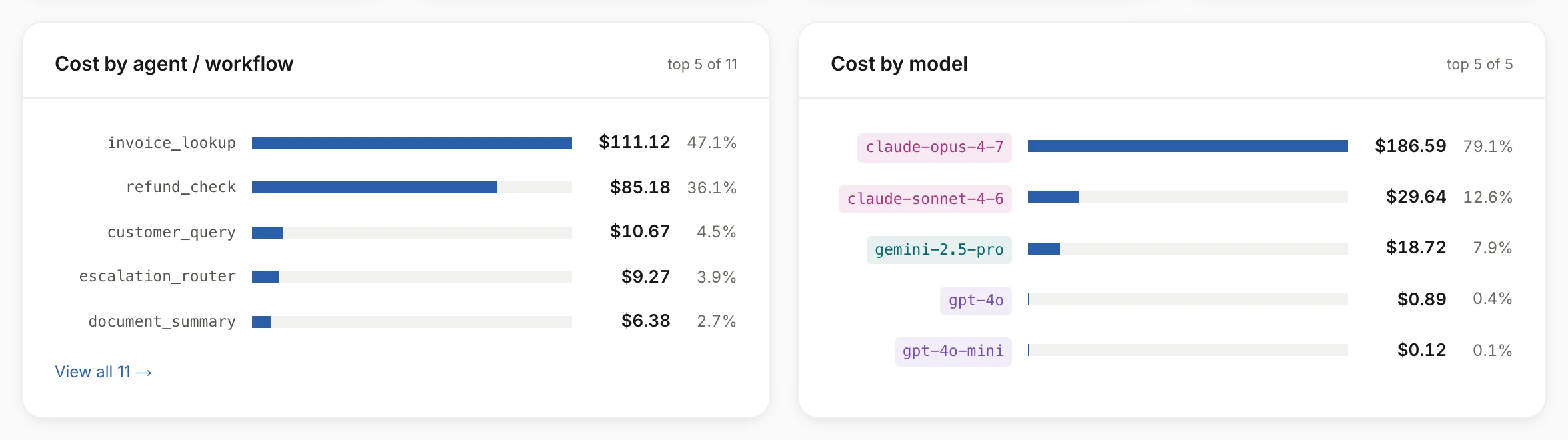
Find the cost. See the customer, workflow and model behind it.
Sample data · Spendline demo account (opens the full-size image in a new tab)Customer detail: one customer’s month-to-date AI cost by workflow and by model. Tap the image to see it full size.
2
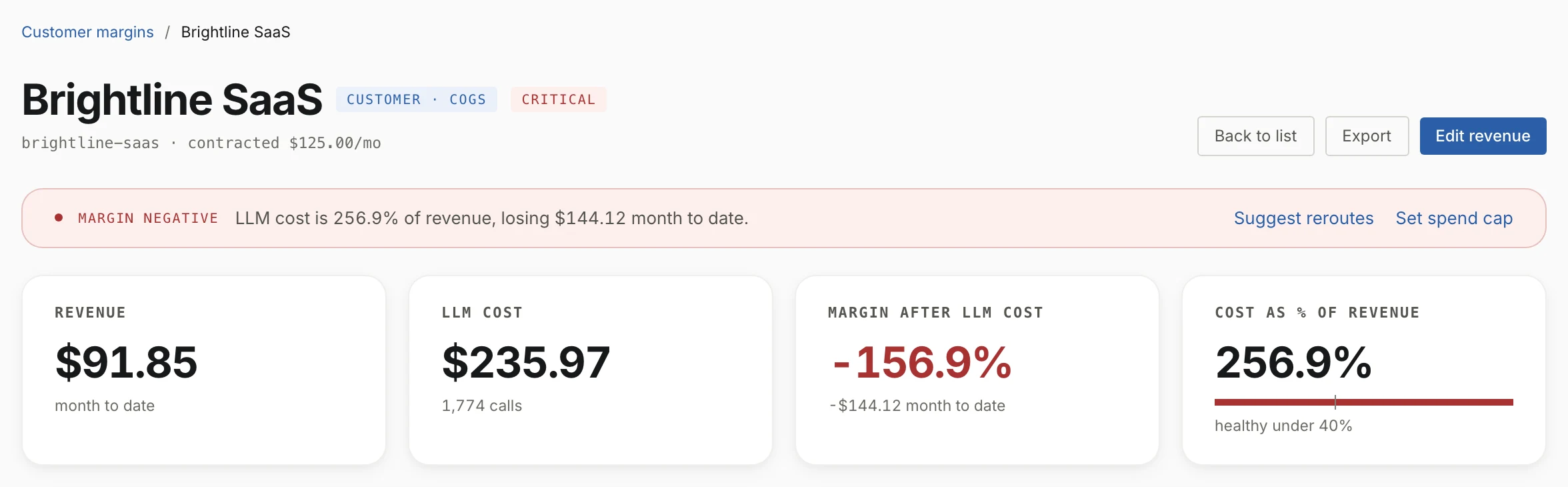
Check the economics. Compare revenue with AI cost for the same period, where you share revenue data.
Sample data · Spendline demo account (opens the full-size image in a new tab)Customer detail: revenue, AI cost and margin after AI cost for the same month. Tap the image to see it full size.
3
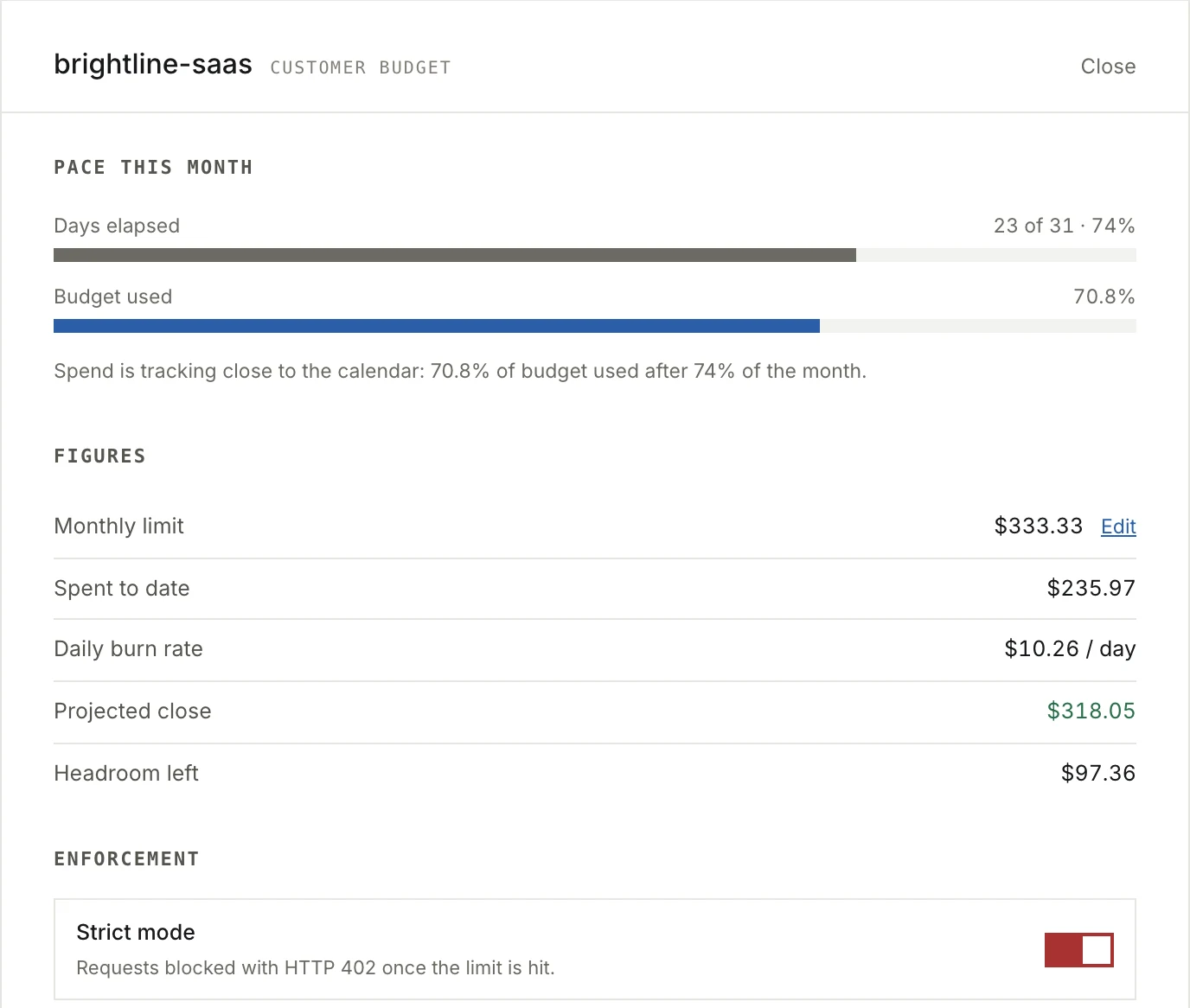
Control the next request. See why a configured budget allows or refuses it.
Sample data · Spendline demo account (opens the full-size image in a new tab)Customer budget: this month’s pace, the limit and spend so far, and strict enforcement at the limit. Tap the image to see it full size.
Screens from Spendline's demo account. Its figures are separate from the ExampleCo example above.
Your application supplies the customer and workflow labels. Spendline checks the configured budget before forwarding a supported request, then records usage and attributed cost.
Add customer revenue when you want to compare the two over the same period.
Request path: your application sends a request with customer and workflow labels to Spendline. Spendline checks the configured budget before forwarding it to your model provider, which returns the response and usage. Spendline then records usage and cost. Customer revenue, which you enter or import, goes to reporting separately and does not come from the provider.
Your engineer changes the endpoint for a supported route and adds attribution labels to its requests. We help check that the right customer receives the cost record and that the budget behaves as expected before you expand the pilot.
Review the supported APIs and data-handling details with your technical owner before connecting production traffic.
Providers: OpenAI, Anthropic, Google Gemini, xAI, Mistral, DeepSeek, Qwen, Together AI, Fireworks AI and Groq.
/v1/chat/completions
OpenAI, Google Gemini, xAI, Mistral, DeepSeek, Qwen, Together AI, Fireworks AI, Groq · Streaming: supported
/v1/messages
Anthropic · Streaming: supported
/v1/responses
OpenAI · Streaming: non-streaming only
Embeddings, images, audio and speech, vector or knowledge-base search, and Google’s native generateContent API are not supported.
What the 30-day pilot includes
A guided evaluation of customer-cost records and budget controls on your live production traffic. The 30 days start when your traffic flows through Spendline, not at sign-up.
Start with one application or workflow. Your technical owner works with us to validate attribution and a budget rule. Customer revenue is optional; it is needed to show margin after AI cost, where you share revenue data.
Founder-supported setup with three checkpoints. Day 7: a technical check of traffic, attribution, budget enforcement and latency. Day 14: a review of what you have learned. Day 30: continue on the agreed paid terms or stop. Where more evidence is genuinely needed, we can extend once, by up to 30 days.
We agree scope, success criteria and paid terms before the pilot starts. There is no Spendline subscription fee during the pilot; your model-provider charges still apply. Nothing is billed unless you choose to continue.
No. Customer-cost tracking and budgets work without it. Where you share revenue data, Spendline compares revenue with attributed AI cost over the same period.
Is margin after AI cost our full customer profitability?
No. Where you share revenue data, this view subtracts attributed AI cost from revenue. Hosting, support, payment fees and other delivery costs are not included.
Can a budget ever be exceeded?
Spendline checks estimated request cost before forwarding. Final usage can cost more than the estimate. Controls cover supported requests routed through Spendline; we check the configured behavior during the pilot.
How is this different from LiteLLM?
LiteLLM already offers cost attribution and budget enforcement. Spendline brings customer-cost records, revenue comparison where you share revenue data, and budget decisions into a workflow for engineering and finance. The call establishes what you need beyond the tools you already use.
Do we need another SDK?
No additional SDK is required for supported routes. Your engineer changes the relevant endpoint configuration and supplies attribution labels. The integration guide lists supported APIs and their limits.
What data passes through Spendline?
Spendline processes supported requests and responses as it forwards them. Our data posture explains the current processing, storage and retention details.
What happens after the free pilot?
Paid pricing combines a platform fee with a capped charge based on managed AI spend. We agree included features and paid terms before you start, and nothing is billed unless you choose to continue. You decide at the day-30 review.
See what this would look like in your product.
Bring one example of how your app calls AI. We will map the customer labels, show the cost view and agree what a pilot would test.
 Spendline is a member of the NVIDIA Inception program.
 (opens the full-size image in a new tab)
 (opens the full-size image in a new tab)
 (opens the full-size image in a new tab)