Guide
The One-Week AI Cost-to-Serve Audit
A free, step-by-step method to measure what AI costs you per customer in one week: the fields to log, the queries, a worked example and the errors to avoid.
The short answer: pick one production AI workflow, tag every model call in it with the paying account for one week, price each call from its token counts, then rank your customers twice: by AI cost, and by AI cost as a share of what they pay. The second ranking is the one that matters. Usage varies customer by customer while the subscription price does not, so a healthy blended figure can sit on top of accounts whose AI usage alone eats most of what they pay.
The scope is deliberately narrow: model inference cost for one workflow. Embeddings, retrieval, vector storage, external tools, infrastructure and human review are not counted unless you log them as calls too, so the result is a lower bound on cost to serve, not a gross margin.
This guide gives the whole method, free, so a team can run it without us: the fields to log, how to check coverage, the queries, a worked example and the mistakes that make the numbers wrong. For a workflow with one integration point and accessible logs, expect about a day of engineering to set up and a week to collect; more call paths mean more setup.
Why the average answers the wrong question
Most teams know one number: the monthly model bill divided by the number of customers. That average describes almost no real account. Per-customer AI cost is a product of several factors (active users, actions per user, which features they touch, how many model calls an action makes, how much context each call carries), and modest differences in each multiply. The result is a long tail, which we explore in the customer who costs you 50x more than the rest.
The provider invoice cannot fix this. Provider reports group usage by model, project or API key. Your application supplies the customer and workflow context needed to see cost per account, so the per-customer view has to be built on your side.
Historical records and new instrumentation answer different questions. If your existing logs already hold a customer ID and token counts for each call, you can run the queries below on past months and treat the result as historical evidence. If they do not, the audit starts recording from the day the fields are added, and the week you collect describes that week only. It is not evidence about earlier months, and an account that was heavy in a past quarter may look ordinary in a quiet week. Say which kind of data a figure comes from whenever you report it.
The audit, day by day
Day 1: choose the scope and set the fields. One workflow (the one with the largest share of model spend, if you know it) and one integration point (the single place in code where that workflow calls the model). Every call from that point must carry:
| Field | Set by | Why it matters |
|---|---|---|
customer_id |
Your server | The paying account, the join key to revenue. Never accept it from the client. |
workflow_id |
Your server | Lets you repeat the audit on the next workflow without mixing results. |
run_id |
Your server | Groups every call caused by one user action, so a 30-call agent run reads as one run. |
model |
Response | Different models, different rates. |
created_at |
Server clock | Decides the day and month the cost lands in. |
attempt |
Your retry logic | Retried calls are real usage; log each attempt, not only the one that succeeded. |
| Token types | Response usage |
Fresh input, cache writes, cache reads, output (reasoning tokens included). Each has its own price. |
Day 1: give the workflow its own API key. This is the cheapest coverage check available. Anthropic's Usage and Cost API, for example, can filter usage by API key in hourly buckets. At the end of the week the provider's total for that key is an independent completeness check. Compare like with like: the same token categories, the same models and the same UTC window. If your logs fall short, investigate before trusting the audit; a call path that bypasses your integration point is one cause, reporting delay and a mismatched time window are others. This checks coverage of usage; it does not by itself reconcile dollars.
Days 2 to 7: collect. Leave it running. A week covers weekday peaks and quiet weekends. Resist adding a second workflow halfway through; mixed scope is the most common reason a first audit produces numbers nobody trusts.
Day 7: price, roll up and compare with revenue. Price each call from its token counts at the rates in force that day, then run the queries below.
The queries
The SQL below is self-contained and runs on Postgres: a sample schema, one view with a row per account, and three queries. Monthly figures are the week times 30/7, good enough to rank accounts but not a forecast. Accounts with no revenue record stay in the results with an unknown share of price instead of disappearing.
-- Sample schema: one row per model call, one row per paying account
CREATE TABLE ai_calls (
  call_id      text        PRIMARY KEY,
  customer_id  text        NOT NULL,
  workflow_id  text        NOT NULL,
  run_id       text        NOT NULL,
  model        text        NOT NULL,
  attempt      int         NOT NULL DEFAULT 1,
  created_at   timestamptz NOT NULL,   -- server clock, UTC
  cost_usd     numeric     NOT NULL    -- priced from token counts
);
CREATE TABLE accounts (
  customer_id        text    PRIMARY KEY,
  monthly_price_usd  numeric NOT NULL
);

-- One row per account for the audit week. LEFT JOIN keeps accounts
-- with no revenue record visible, with an unknown share of price.
CREATE VIEW per_account AS
SELECT c.customer_id,
       SUM(c.cost_usd)                                      AS week_cost,
       COUNT(DISTINCT c.run_id)                             AS runs,
       SUM(c.cost_usd) / COUNT(DISTINCT c.run_id)           AS cost_per_run,
       SUM(c.cost_usd) * 30 / 7                             AS monthly_estimate,
       a.monthly_price_usd,
       100 * SUM(c.cost_usd) * 30 / 7 / a.monthly_price_usd AS cost_pct_of_price
FROM ai_calls c
LEFT JOIN accounts a USING (customer_id)
WHERE c.workflow_id = 'support_agent'
  AND c.created_at >= '2026-10-05T00:00:00Z'
  AND c.created_at <  '2026-10-12T00:00:00Z'
GROUP BY c.customer_id, a.monthly_price_usd;

-- 1. Accounts ranked by AI cost as a share of price (unknown price last)
SELECT customer_id, runs,
       ROUND(week_cost, 2)         AS week_cost,
       ROUND(cost_per_run, 4)      AS cost_per_run,
       ROUND(monthly_estimate, 2)  AS monthly_estimate,
       monthly_price_usd,
       ROUND(cost_pct_of_price, 1) AS cost_pct_of_price
FROM per_account
ORDER BY cost_pct_of_price DESC NULLS LAST;

-- 2. The shape of the distribution
SELECT ROUND(PERCENTILE_CONT(0.5) WITHIN GROUP (ORDER BY monthly_estimate)::numeric, 2) AS median,
       ROUND(AVG(monthly_estimate), 2) AS mean,
       ROUND(MAX(monthly_estimate), 2) AS max,
       ROUND(100 * SUM(monthly_estimate) FILTER (WHERE rk <= 5)
                 / SUM(monthly_estimate), 1) AS top5_share_pct
FROM (SELECT monthly_estimate,
             RANK() OVER (ORDER BY monthly_estimate DESC) AS rk
      FROM per_account) t;

-- 3. Coverage: how much of the week's cost can be compared with revenue
SELECT COUNT(*)                                         AS accounts_with_cost,
       COUNT(monthly_price_usd)                         AS accounts_with_price,
       ROUND(100 * SUM(week_cost) FILTER (WHERE monthly_price_usd IS NOT NULL)
                 / SUM(week_cost), 1)                   AS pct_of_cost_with_revenue
FROM per_account;
A worked example
Here is an illustrative result for 40 accounts: 22 on a $400 plan, 14 on $1,200 and 4 on $3,000 a month. The data is generated for this guide, not taken from any customer, and every number below comes from it. Download the 40-account example as CSV to check them or to test the queries.
The blended view looks fine: $6,156 of estimated monthly AI inference cost against $37,600 of revenue, or 16.4%. The distribution says something else:
- The median account costs $69.51 a month. The mean is $153.90, pulled up by a few heavy accounts.
- The top five accounts produce 59.4% of the AI cost.
- The account with the highest AI cost, $1,226 a month, pays $3,000, so it spends 41% of its price on inference.
- The worst ratio belongs to a different account: a $1,200 customer whose week cost $268.57 across 675 runs (about $0.40 a run). Times 30/7 that is $1,151 a month, 96% of its price, before any other cost of serving it.
- Three $400 accounts cost $289 to $322 each, between 72% and 80% of their price.
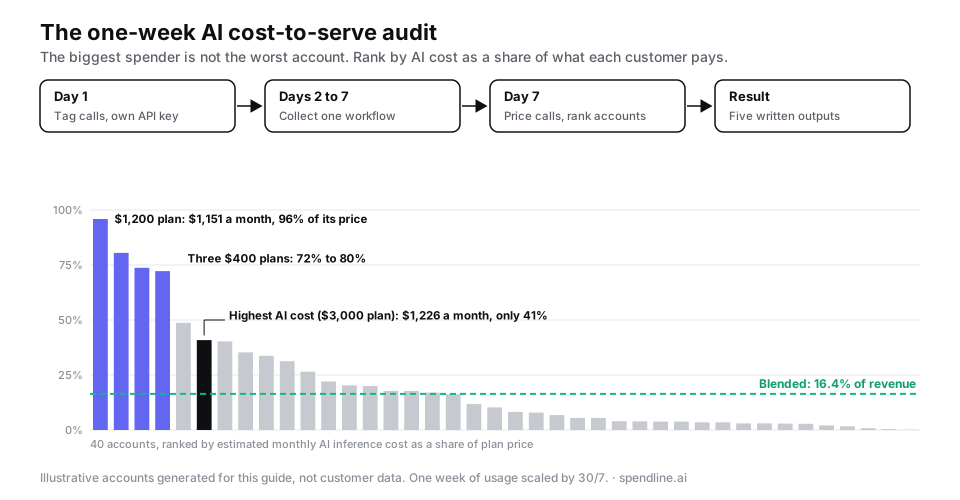
Four of 40 accounts spend more than half of what they pay on AI inference for this one workflow, and none of them shows up in the blended 16.4%. That is the finding the audit exists to produce. The full margin calculation, with the other costs of serving an account, is in how to calculate AI gross margin by customer.
The five outputs
Write these down at the end of the week. If you cannot fill one in, the audit is not finished.
- Cost per customer and per run for the workflow, as a distribution: median, mean, maximum, top-five share, plus how many accounts and what share of cost could be matched to revenue.
- The outliers: the accounts with the highest cost as a share of price, and what they do differently (more users, longer documents, a heavier feature).
- Margin impact where revenue data exists: which accounts fall below the margin you price for.
- One inefficiency you did not know about. Common candidates: retries that double a run, a long stable prompt prefix that is not cached (on Anthropic's current models a cache hit costs between 2.5% and 10% of the fresh input price), a large model doing a classification step a small one could do, or an agent loop with no step limit. Which of these shows up is specific to your workflow.
- One recommended control: a pricing change for a heavy plan, a usage limit on one feature, a cheaper model for one step, or a per-run cap on agent steps.
Three ways to collect the week of data
| Provider usage export | Logging in your code | Proxy at the network path | |
|---|---|---|---|
| Shows cost per customer | No; by key, project and model only | Yes, if every call path is wrapped | Yes, for routed calls on the API shapes it supports |
| Setup | None | Wrap the one integration point | A base URL change plus metadata injection for full attribution |
| Coverage check | It is the check | Against the provider's per-key total | Against the provider's per-key total |
| Good for the audit week | As the reference total | Yes | Yes |
| Good after the audit | No | Only while someone maintains it | Yes, for routed traffic, and can check a budget before a call is forwarded |
For a one-week audit, logging in your own code is entirely sufficient. An open-source proxy such as LiteLLM, or a managed one such as Spendline, matters when you want the measurement to keep running after the week, or want to act on what it finds; the trade-offs are in how to track LLM costs per customer.
After the audit
The audit answers a question once. Two things follow if the answer is uncomfortable. The first is acting on it: a usage limit per account or per run, checked before the call reaches the provider, so an outlier cannot recur silently; agent runs are where this matters most, as what an AI agent run costs shows. The second is making the number durable: the same per-call records, kept as an append-only ledger, become what finance compares with the provider invoice at month end.
Common errors
- Customer ID from the client. Spoofable, and it moves cost onto the wrong account.
- Only the successful attempt logged. Retried calls vanish and heavy accounts look cheaper than they are.
- Cached and fresh input priced the same. Overstates cost for accounts that reuse long context.
- Averages reported instead of the distribution. The outliers disappear into the mean.
- Ranking by cost, not by cost against price. The biggest spender is often not the least profitable account.
- No coverage check. Without the per-key total you cannot tell a cheap week from a week of missing calls.
FAQ
What is an AI cost-to-serve audit? A one-week measurement of what one AI workflow costs per customer in model inference, compared with what each customer pays. It is a starting point, not a full gross margin.
Why only one workflow and one week? One code path keeps the setup to a day, and a week covers weekday and weekend usage. You get a distribution you can act on.
What fields does each model call need to carry? Account, workflow and run IDs set by your server, plus model, server timestamp, attempt number and every billed token type.
How do I know the audit did not miss any calls? Give the workflow its own API key and compare your logged tokens with the provider's usage report for that key, using the same token types, models and UTC window. Investigate any gap before trusting the result.
Is the most expensive customer the least profitable one? Often not. Rank by cost as a share of revenue. In our example the top spender used 41% of its price; a smaller account used 96%.
Sources and method
Written by the Spendline team. Public sources checked on 12 October 2026: per-key, hourly usage reporting from Anthropic's Usage and Cost API documentation; cache-hit pricing from Anthropic's pricing documentation. The 40-account example is illustrative, not customer data. It was generated from a fixed random seed: plan prices drawn with probabilities of 45%, 40% and 15%, which produced 22, 14 and 4 accounts; monthly costs drawn from a log-normal distribution with the $3,000 plan's usage scaled up 1.6x; weekly cost is the monthly draw times 7/30, and run counts assume $0.25 to $0.60 per run. The CSV holds the exact 40 rows, every statistic quoted is computed from it, and the SQL in this guide was run against it on Postgres to confirm the same figures. The day-by-day plan, the list of common inefficiencies and the comparison table are our judgment. Last updated: October 2026.
See what this would look like in your product.
Start with a guided 30-day free pilot on live production traffic. The 30 days start when your traffic flows through Spendline, not at sign-up. We agree the scope, success criteria and paid terms before you start. There is no Spendline subscription fee during the pilot; your model-provider charges still apply.
Prefer email? fida@spendline.ai